
| 일 | 월 | 화 | 수 | 목 | 금 | 토 |
|---|---|---|---|---|---|---|
| 1 | 2 | 3 | 4 | 5 | 6 | |
| 7 | 8 | 9 | 10 | 11 | 12 | 13 |
| 14 | 15 | 16 | 17 | 18 | 19 | 20 |
| 21 | 22 | 23 | 24 | 25 | 26 | 27 |
| 28 | 29 | 30 |
- n번방 자료실
- 개똥벌레
- 실평수에 따른 에어컨 평형 산정 상세기준
- PeiD v0.95 인터페이스
- SciTe 에이터 한글 메뉴 표시하기
- 작업 표시줄에서 휴지통 비우기
- 그 이유 6
- WinRAR
- 현실적으로 60살 넘어 돈을 이정도 모았으면..
- 커피 마시기 전 반드시 알아야 할 5가지
- 다주택자
- ConfuserEX를 언패킹하는 도구
- 새로운 출발
- 걸림돌과 디딤돌
- 나를 평가하는 습관에서 벗어나는 법
- 파솔로 2018 18.0.162.0 한글
- 상속
- SysRestorer3
- 티톡 유티리티
- 연금
- 화면 캡쳐
- HexTemplate
- FxSound Pro
- 신장 건강에 좋은 음식
- LoveString v2.0 / 문자열 인코딩 쿼리
- 반디집
- HexCmp2
- 인생 네비게이터
- andar
- Freeware Hex Editor Neo 6.52
- Today
- Total
인생 네비게이터
FastStone Capture 8.7 한글 버전 본문
FastStone Capture 8.7 한글 버전
FastStone Capture는 강력하고 가벼우면서도 모든 기능을 갖춘 화면 캡처 도구로 창, 개체, 메뉴, 전체 화면, 직사각형/자유로운 영역, 스크롤링 창/웹 페이지를 포함하여 화면의 모든 것을 쉽게 캡처하고 주석을 달 수 있습니다. 또한 화면 활동과 사운드를 비디오 파일에 기록 할 수 있습니다.

새로 바뀐점은 아래와 같으며,
Version 8.7
(November 28, 2017)
Enhanced the Draw tool, now you can:
- Draw curved text
- Insert text along a curved line (Right-click on the line and select "Insert Text")
- Draw fancy lines (10 styles)
- Apply an Outline effect to lines, rectangles and ellipses
- Added an option (Use @ in file name template) to generate random characters (0-9,a-z,A-Z) in file names. See "File Name" tab in the Settings
- Other minor improvements and bug fixes

위와 같이 하드코딩 문자열 영문 언어로 표시되는 부분을 일부 한글화 번역 완료
FastStone Capture 9.0 버전
** 한글 버전 : ....
FastStone Capture 9.3 버전
Version 9.3 (November 19, 2019)
- Enhanced Draw tools
- Added Indent option to Highlighter
- Added Shape option to Line Highlighter
- Added Bracket tool
- Added Blur tool
- Improved image quality of Magnifier
- Other minor improvements and bug fixes
** 첨부 파일 참조(영문)
FastStone Capture 9.4 버전
Version 9.4 (August 21, 2020)
Added OneNote as an output option
- Added 3 options to Editor tab of Settings:
- "Set default tool in Draw"
- "Highlight active tab"
- "Use workspaces to group tabs". This option allows you to organize and group captured images (tabs) in multiple workspaces. Each workspace remembers its last-used folder and works like a separate instance of FastStone Editor
- Added "Stay on Screen" and "Minimize to System Tray" options to "Run when Windows starts"
- Added "Send to New Tab" (Alt+C) to duplicate the current tab as a new tab
- Added a count down text box to "Delay before Capture"
- Added Apply button to Settings window
- Added 2 icons (left/right clicks) to "Insert Mouse Pointer" in Draw tool
- Enhanced "Save As" and "Open" dialogs:
- Added "Hold Alt key to peek behind this window" option to "Save As" dialog
- Resizable
- Size and position are kept for next use
- Added "Delay before showing" option (click [...] in Toolbar tab of Settings) for the hidden toolbar
- Added preview option to "Spotlight" effect
- Added a right-click menu to "Capture Fixed-Size Region"
- Added Contrast and Gamma auto-adjustment to "Acquire Images from Scanner". Enhanced the De-skew algorithm
- Added tips for the toolbar buttons of FastStone Editor
- In Draw tool, press Tab/Shift+Tab to cycle through drawing tools
- Enhanced "Screen Color Picker". After picking a screen color, click the "New" color box to fine tune the color
- Enhanced Print dialog. Now you can:
- Print multiple images in batch mode
- Print file name in the header area
- Enhanced Edge/Watermark. Watermark image is resizable
- Enhanced "Make Background Transparent" (Ctrl+T) by adding 3 options: Preview, Tolerance and Anti-aliased
- Enhanced "Fill with Color" in Draw tool by adding 2 options: Tolerance and Transparent Fill
- Optimized loading speed of Draw tool. Now it re-opens much faster
- Many other minor improvements and bug fixes
-- 리팩 버전
FastStone Capture 9.4 한글 버전
++ 도움말 한국어 적용
++
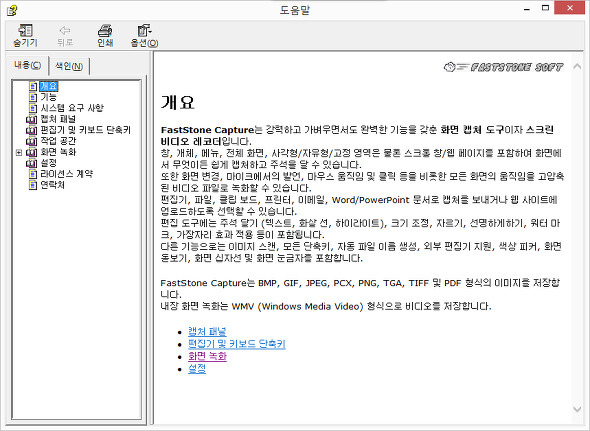
FastStone Capture 9.5 한국어 버전
-- 한국어 지원
-- v9.5 버전부터 한국어 지원
-- 단일 파일 버전
관련 정보 :
-- FastStone Capture 제품 홈페이지 바로 가기,
글타래 : 화면캡쳐, 오픈캡쳐, FastStoneCapture, OpenCapture, #화면 갈무리, #HyperSnap, #WinSnap,
게시글 이력
-- 2020.06.01 : 게시글 수정
-- 2020.08.30 : 내용 수정
-- 2021.05.19 FastStone Capture 9.5 한국어 버전 추가
'소프트웨어' 카테고리의 다른 글
| Quad-Directory-Explorer 소개 (0) | 2026.01.11 |
|---|---|
| DiskShot v3.9.1001 (3) | 2026.01.10 |
| 실행 파일 압축 유틸리티 (0) | 2026.01.10 |
| ReNamer 7.3 한국어 (1) | 2026.01.10 |
| AutoCAD 2025 ENGLISH (0) | 2024.03.27 |